
English
Connect Airbnb or another channel with two-way iCal sync
iCal shares unavailable date ranges between Salisea and channels such as Airbnb or Booking.com. Set up both directions for each unit:
- Import the channel calendar into Salisea.
- Export the Salisea calendar back to that channel.
Never reuse one unit’s feed for another unit.
Import the channel calendar
In the channel, open the listing’s calendar availability or calendar-sync settings and copy its export link.
In Salisea:
- Open Calendar, then Calendar sync.
- Expand Add import feed.
- Enter a recognizable name such as “Airbnb - Sea View Apartment.”
- Select the matching Salisea unit and platform.
- Paste the channel’s iCal URL and save.
- Choose Sync now for the first import.
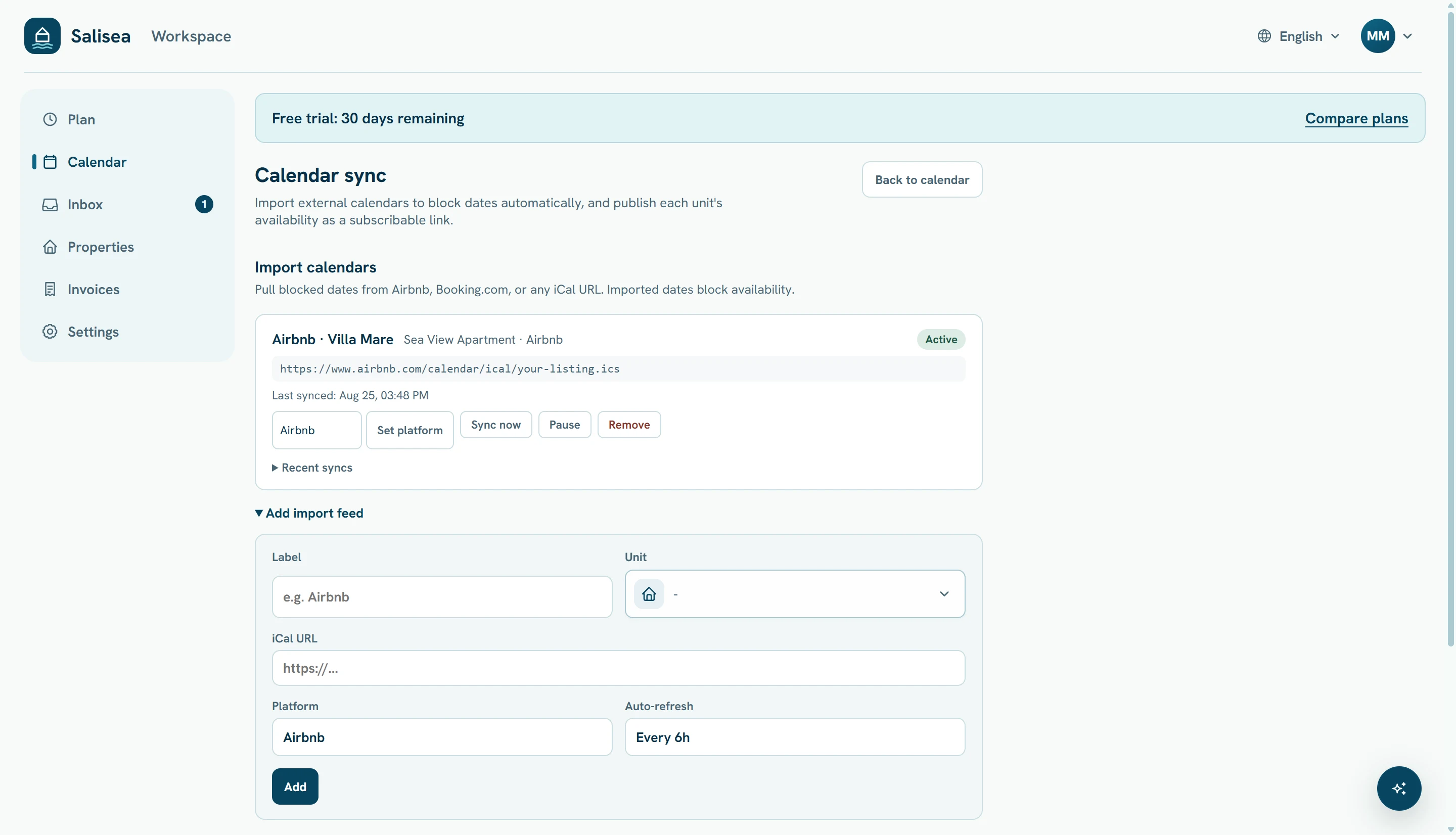
Imported entries block availability and appear as imported calendar events. They are controlled by the source channel.
Export Salisea availability to the channel
Under Export links, select the same unit and the platform, then choose Generate link. Copy the generated URL.
Return to the channel’s calendar-sync settings, choose its import-calendar option, paste the Salisea URL, and give the connection a clear name. The Salisea feed contains availability only; it does not publish guest details.
Use a separate export link for each platform so Salisea can show when that channel last fetched it.
Test both directions
Use dates well in the future that have no real guest activity.
- Block a short test range in the channel.
- Run Sync now in Salisea and verify those dates become unavailable.
- Release the test range in the channel and sync again.
- Create a short manual test block in Salisea.
- Refresh the connected calendar in the channel and verify the dates become unavailable there.
- Remove the temporary Salisea block and refresh once more.
Calendar end dates are checkout dates: a range from 20 October to 22 October blocks the nights of the 20th and 21st.
Allow for refresh delays
iCal is periodically refreshed, not instantaneous. Sync now fetches an import into Salisea, but each external platform controls when it fetches Salisea’s export. Use Recent syncs, Last synced, and Last fetched by channel to understand the current state.
Keep the feeds active and verify critical availability in both systems before accepting a time-sensitive booking. If a date is wrong, correct it in the system that owns the event, then refresh the connection.
You have now completed the core Salisea setup. Return to the user guide index whenever you add a property, unit, mailbox, or channel.